Trucking dispatch software for the Philippines
Dispatch to delivery, one system.
Trip and dispatch management software for trucking companies in the Philippines. Take a trip from booking through dispatch to a confirmed proof of delivery, with trip costs tracked along the way, on any device your team already owns.
Booking to delivery, one flow
- Book
- Dispatch
- Deliver
- Prove
- Review
The board your Excel maze is trying to be.
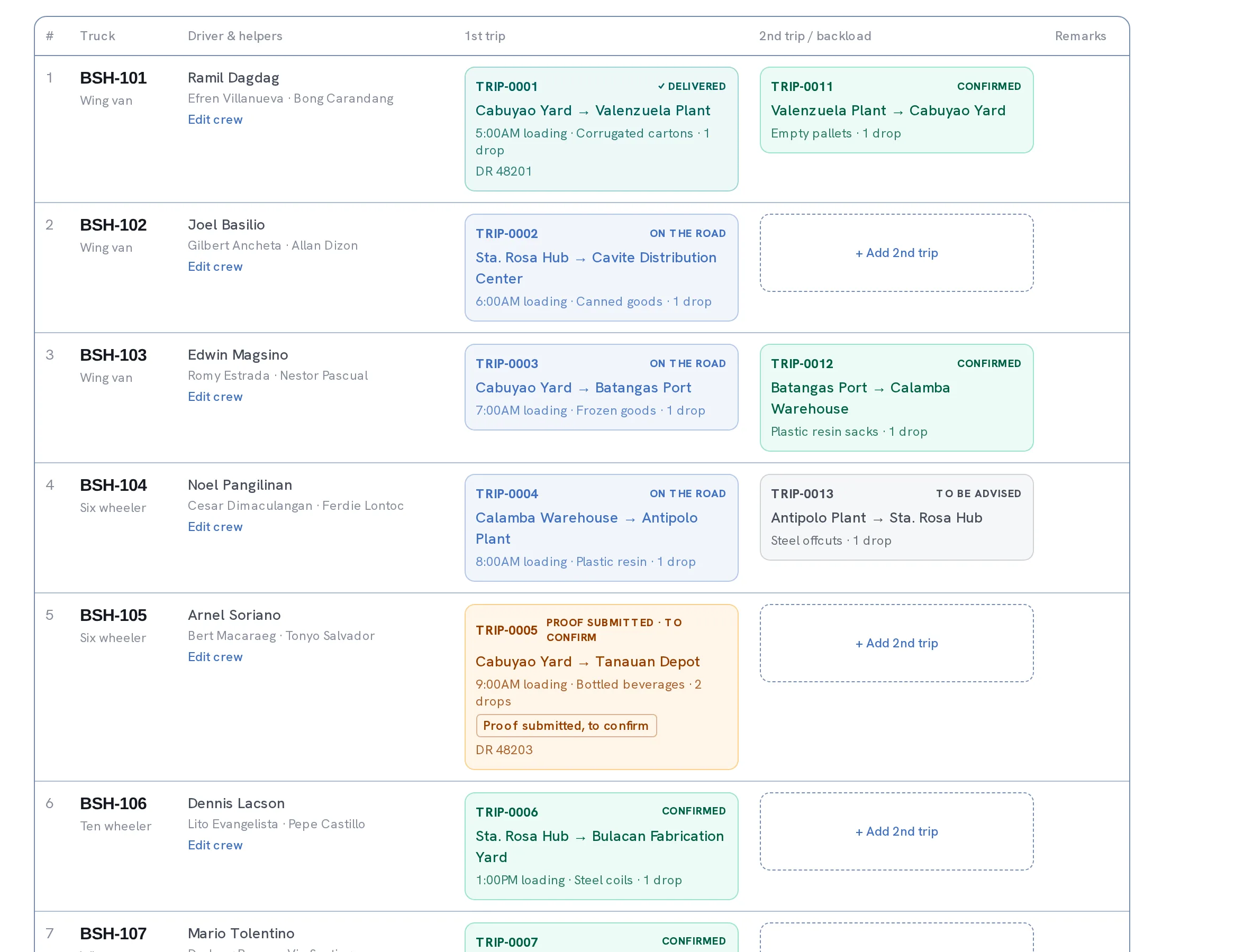
The allocation board — your Excel replacement
Every trip moves through one board — tba, confirmed, dispatched, delivered — so a dispatcher stops juggling a shared spreadsheet that only one person can safely open at a time. A truck swap, a crew change, or a status update writes to a running change log automatically, so when a trip looks off you can see exactly what changed, and when, without asking around the office.
Start freeDispatch message generator — one tap to send
Riri writes the dispatch message for you — the same message text your dispatcher used to retype by hand for every truck, every day — ready to copy straight into chat. Your own checklist and reminder lines live in Settings, so every driver gets the same clear instructions in the same format, no matter who's dispatching that morning.
Start free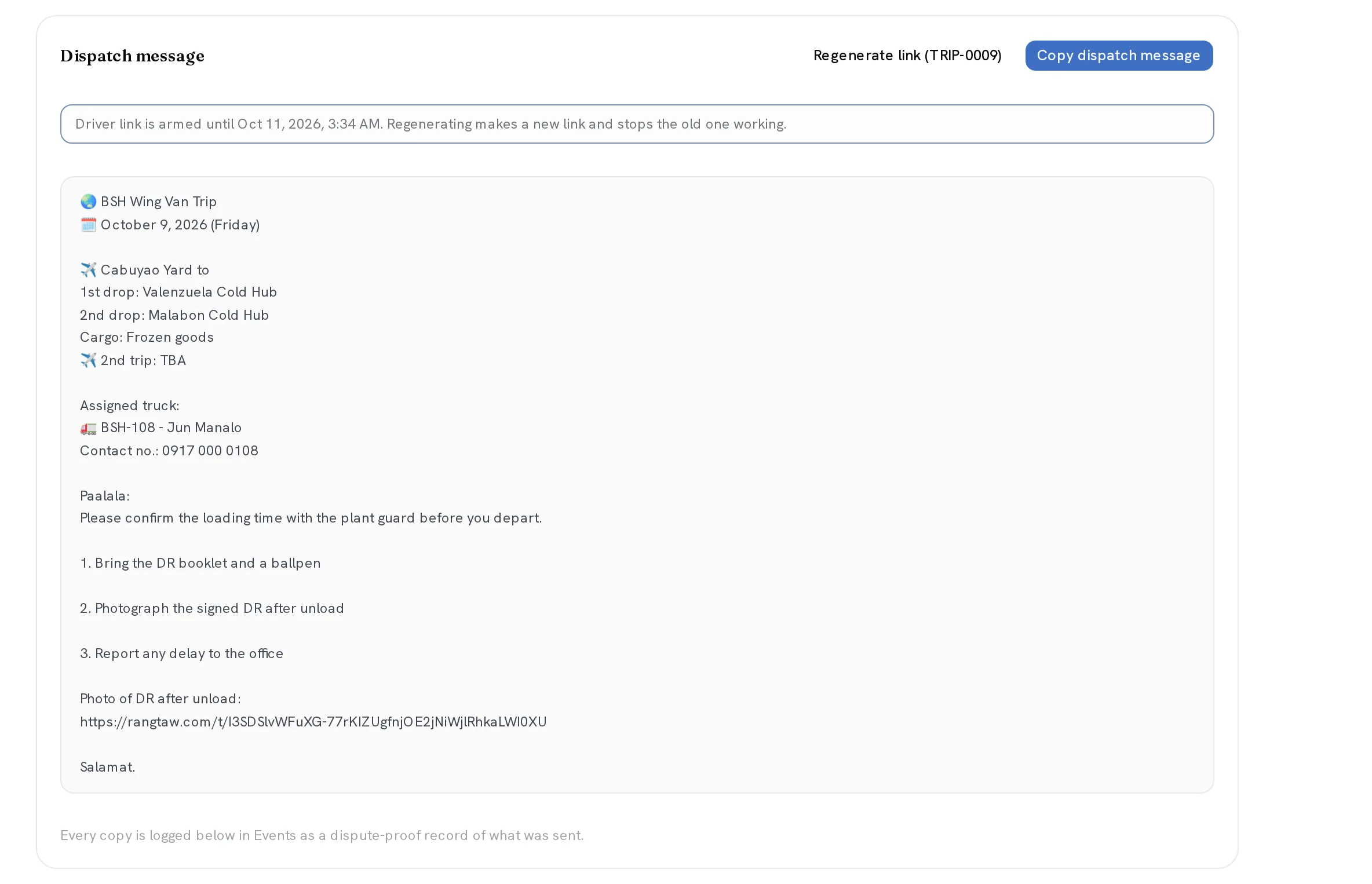
Driver proof of delivery — no login, no app
The driver taps a link sent with the dispatch message, photographs the signed delivery receipt on his own phone, and submits it — no login, no app to install, no account to set up. A human at the office reviews the photo and confirms the trip delivered, so proof of delivery never rests on a driver texting a blurry photo two days later, or not texting it at all.
Start free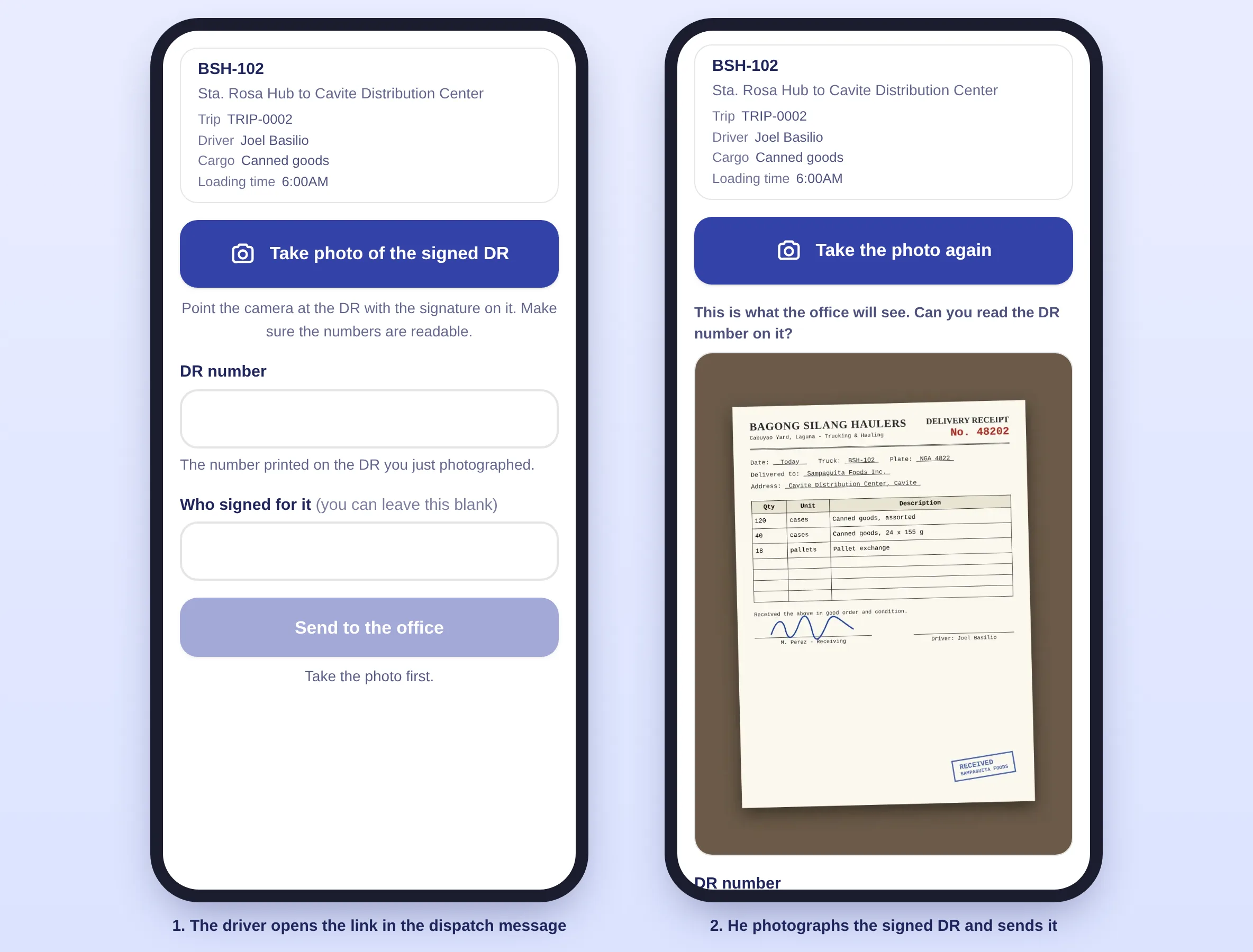
Trip expenses & costs
Fuel, toll, allowance, and other costs get recorded against the trip as they happen, so you know what a trip actually cost instead of reconstructing it from receipts at month-end. Every cost sits on the trip itself, so you can open any trip and see its real cost at a glance — not a separate spreadsheet somebody has to reconcile by hand.
Start free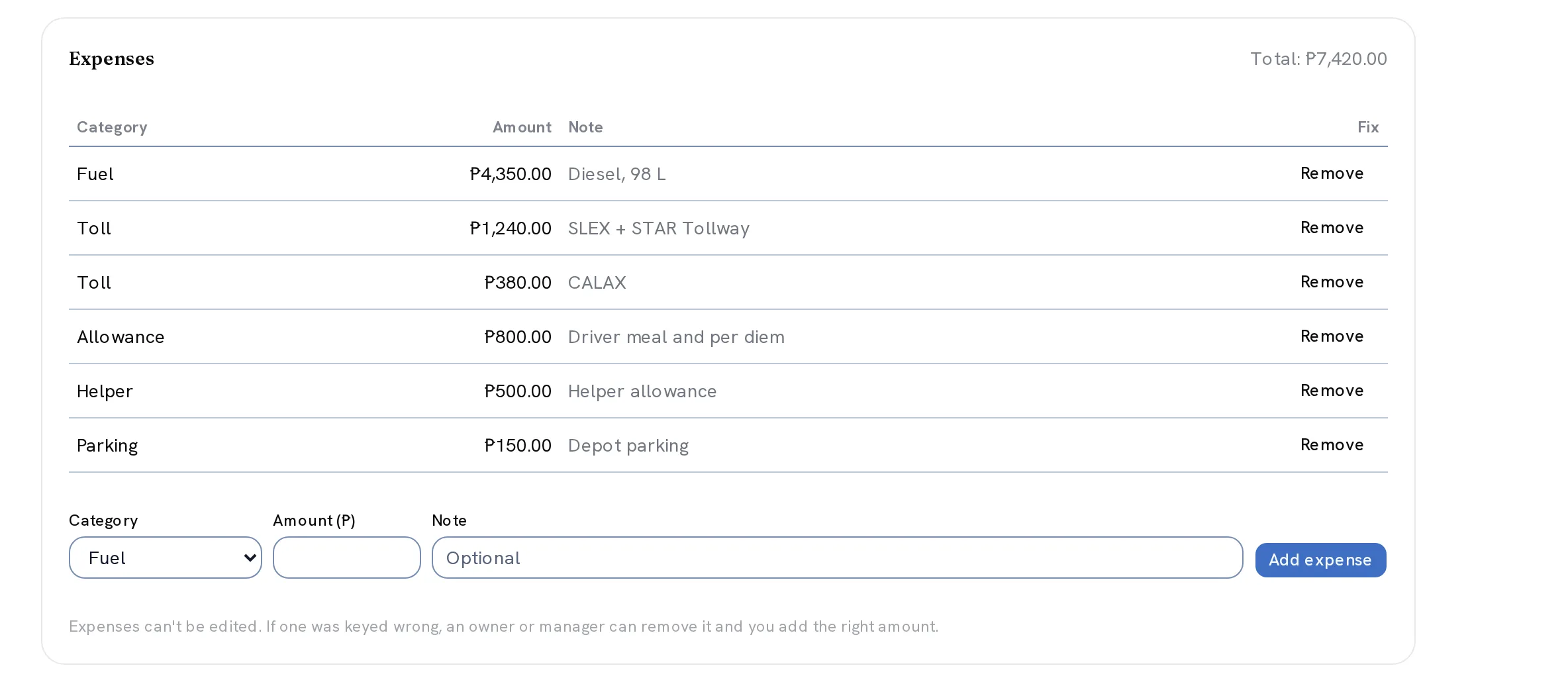
Questions, answered
Can my whole dispatch team log in, or do you charge extra per driver?
Your whole team can log in, and we never charge extra for it. Riri never charges by how many people log in, so your dispatcher, your office staff, and anyone confirming deliveries each get their own login at no added cost. That matters because pricing tied to headcount quietly punishes a growing fleet: the more people who touch the board, the more the bill climbs, which pushes teams toward sharing one login and losing any trail of who changed what. Riri does the opposite — give everyone their own account, keep accountability intact on the trip change log, and pay the same regardless of team size. A new dispatcher or a new confirmer is just another login, not another line item to negotiate. For a trucking operation where dispatch, the yard, and the office all touch the same trips, unlimited logins is the point, not an upsell.
Can I export my trip data, or is it locked in?
You can export it, and it's never locked in. Right in Settings, Riri gives you a one-click standard CSV covering your trips, your vehicles, your trip expenses, your customers, and your team accounts, so at any moment you can pull a clean, portable copy of your own operational records. There is no call to make, no support ticket to file, and no exit fee — the export buttons live right inside the app you already use every day. We build it this way deliberately: your trip history belongs to your business, not to the software, so leaving is allowed to be easy. No contracts to wind down and no hostage data means you stay with Riri because it works for your fleet, not because switching would cost you your records. The same export is available whether you're running a busy season or planning a move.
Does Riri track proof of delivery for every trip?
Yes, and it's designed around how a real driver actually works. After a trip is dispatched, the driver gets a link that opens straight to his own trip, with no login and no app to install. He photographs the signed delivery receipt with his phone camera, confirms the receipt number, and submits it from the road. Back at the office, a person reviews that photo against the trip and confirms the delivery, so a trip only moves to delivered once someone has actually seen the proof. If a photo is unclear or wrong, it gets rejected with a reason and the driver can resubmit, so the record stays accurate instead of getting rubber-stamped through a busy afternoon.
What hardware do we need to run Riri for trucking?
None to buy. Riri runs entirely in the web browser on the phones, tablets, and laptops your team already owns, so there's no dispatch terminal to lease and nothing new to install. Your dispatcher works the board from a laptop at the office, while a driver only ever needs the camera on his own phone to submit proof of delivery — no dedicated device, no app store download. That keeps your starting cost at zero and fits how a trucking operation actually runs: people move between the yard, the road, and the office, and the same live board follows them on whatever screen is nearest. Onboarding a new dispatcher or a new driver is a login, never an equipment purchase, which is the whole point of keeping hardware out of the cost of running the system.
How much does Riri cost for trucking companies?
Trucking pricing is straightforward monthly pricing, and we share the exact figures with you in a walkthrough while founding-customer terms are still open. We keep it conversational at this stage so the pricing matches how your fleet actually runs — your truck count, your team size, the routes you run — rather than pointing you at a generic table before we've seen either. What we can promise up front is that there's no lock-in in either direction: no contracts to sign, cancel anytime, and one-click export means your trip data always leaves with you. Founding trucking customers who come on board early get preferential terms, which is part of why pricing is handled in the walkthrough rather than published before the conversation. Book a walkthrough and we'll show you the board on your own trucks and give you clear, honest numbers to decide on.
What is trucking dispatch software?
Trucking dispatch software is one system that runs a trucking company's day-to-day trip operations, replacing the shared spreadsheet and the group-chat scramble most small fleets start with. In the Philippines that means Riri gives a dispatcher one allocation board covering every truck and trip, generates the exact dispatch message a driver receives so nobody retypes it by hand, moves a trip through a clear status lifecycle from booked through dispatched to delivered, and captures a photographed proof of delivery straight from the driver's own phone. Instead of one tool for the board, another for messaging drivers, and a notebook for what a trip cost, everyone works from the same live trip that the office, the dispatcher, and the driver all touch. Good trucking dispatch software is built around the trip itself — booking it, sending it out, and proving it arrived — rather than accounting alone, so the operational picture stays accurate even before any money changes hands.
How does Riri generate dispatch messages for drivers?
Riri builds the dispatch message from the trip itself, so it's always current with the truck, the route, and the crew actually assigned. Your dispatcher opens the trip and copies a message that reads exactly like the one drivers already expect over chat — no retyping the truck plate, the stop order, or the driver's checklist by hand for the tenth time that day. You set your own checklist lines and reminder text once, in Settings, and every generated message reuses them, so a new dispatcher produces the same quality message as your most experienced one. If the assigned vehicle is in the shop or missing a driver, Riri warns before you copy the message, catching a mistake before it reaches a driver already on the road rather than after.
Does Riri track trip expenses like fuel and tolls?
Yes. Fuel, tolls, driver allowance, and other trip-level costs get recorded against the specific trip that incurred them, so you can see what any single trip actually cost rather than a lump monthly total you have to unpick later. Every cost sits on the trip itself the moment it's entered, so instead of digging through a stack of receipts weeks later, you open the trip and its real cost is already there, attached to the run that generated it. Because every cost is tied to a trip, you can look back at a specific run — a specific truck, a specific route, a specific week — and see the real cost behind it, which is the number a fleet owner actually needs when deciding whether a route is worth running again. That per-trip visibility is the point: cost tracking that lives with the trip, not in a notebook somebody reconciles by hand at month-end.